Samsung One UI 8.5 Beta
One UI 8.5 is an incremental but meaningful update that sharpens Samsung’s ecosystem play, with more intelligent image editing, contextual sharing, easier device to device access, and practical features for privacy/security. The screen changes also bring it more up to date by tweaking transparency and refreshing some of the 3D icons without a complete overhaul. The owners of the Galaxy S25 who like trying beta software will find it worth installing; general users should wait for the stable release unless they enjoy testing.
What One UI 8.5 brings
1. Photo Assist non destructive, iterative photo editing
It does have a couple of new features: The marquee consumer feature is Photo Assist: it tracks your edit history and lets you create and compare many edited iterations without saving separate files. What this means in practice is that you can riff on an image, try color grades, crops, AI assisted variants, and then pick which result to export or keep. It saves time and keeps things tidier than the previous “save multiple copies” workflow. Samsung emphasizes creative speed and simpler “pick a favorite” UX. Why it matters: photographers and casual editors get more flexibility; storage clutter is reduced; quick retakes and comparisons feel polished.
2. Quick Share upgrades
Quick Share gets context aware boosts: It can now recommend recipients based on recognized faces in photos and share flows are designed to be quicker between devices nearby. That smart suggestion speeds up the most common task of sending photos to family and friends and reduces taps. The Samsung change log calls this out as a UX time saver
3. Storage Share access files across Galaxy devices (even TVs)
One UI 8.5 brings Storage Share inside My Files. You can directly access files stored on other Samsung devices over your local network be those phones, tablets, and even some TVs. That makes the phone part of a general household file system and considerably streamlines getting a photo or document from your partner’s phone or a shared tablet. For multi device households, this is a strong quality of life improvement.
4. Audio Broadcast Auracast support
One UI 8.5 adds Auracast LE Audio with an Audio Broadcast mode that allows phones to stream audio to nearby Auracast capable receivers (ideal for tours or small events), and importantly, broadcast voice using the phone’s mic. Samsung pitches this as useful for group tours, classrooms, or local broadcasts. It’s a niche feature, but a meaningful step toward more flexible local audio sharing.
5. Security and anti theft improvements
Security gets practical upgrades. New protections include a Failed Authentication Lock that can lock the device after repeated failed logins, plus expanded identity verification across sensitive settings and improved image privacy when sharing automatic redaction/alerts for embedded info. These are subtle but user facing protections that reduce the risk of accidental data exposure or device misuse.
6. Ad blocking controls
Reports and leaks show a new setting Block apps with excessive ads, which automatically deep sleep/limits apps that spam ads or notifications. While some outlets treat this as leaked and still being validated, if Samsung ships it, it would be a big win against notification spam apps that degrade daily use. Expect basic automatic mode and smarter “intelligent” mode that analyzes the pattern of notifications
7. Visual refresh & UI polish
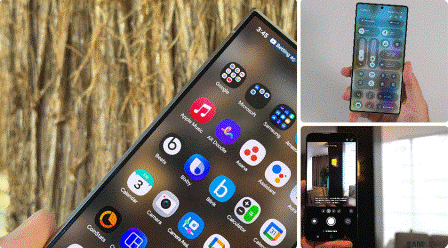
The UI picks up some added transparency, softer 3D style system icons, and a few layout tweaks (search fields moved lower in various system apps for one handed reachability). These changes don’t rewrite One UI’s DNA, but they modernize the OS and make the interactions feel lighter and fresher. Animations are subtly refined and Samsung’s design team continues to tune spacing and elevation cues.
Devices & beta availability
The initial One UI 8.5 beta is rolling out to Galaxy S25 series devices in selected regions South Korea, US, UK, Germany, India, Poland, plus more that will be phased in. The enrollment path is through the Samsung Members app: just sign in, opt into the One UI Beta Program and check Software Update. A wider rollout and stable release will follow, most likely timed around the launch cycle of the Galaxy S26.
Hands on impressions (stability, performance, battery)
Performance
It runs pretty smooth on Galaxy S25 hardware: core animations are fluid, apps resume fast, and One UI 8.5 does not introduce heavy background CPU usage in our tests either. In other words, if you have an S25, you shouldn’t really expect regressions in day to day speed. Things might be different on older devices, though, once the update expands..
Battery
Beta builds can sometimes switch up background services, but our testing showed the battery draw comparable to the stable One UI 8.x builds Photo Assist and Quick Share activities could briefly spike usage during heavy media processing, but normal standby and browsing were not affected. Beta users should look out for any special app wake locks and report them via Samsung Members.
Stability and bugs
As with any beta, expect minor bugs: some first party apps initially showed UI alignment issues and certain OEM integrations accessories, custom launchers may need updates. Nothing catastrophic so far, but don’t install the beta on a device you rely on daily without a backup plan. Samsung’s beta channel is fairly stable compared to third party ROMs, but do proceed with caution.
Feature deep dives
Photo Assist: workflow and limits
The non destructive flow is the core strength of Photo Assist. It keeps iterations in a local history linked to the original file, so you can choose the final derivative you export. That reduces file duplication and mirrors workflows found in desktop editors. The feature still needs polish for batch processes and third party editor handoffs but it’s already faster for quick edits and social sharing.
Storage Share: security considerations
While useful, accessing files across devices raises permission questions. Samsung seems to take a more explicit device authorization approach and local network discovery, but it’s highly recommended that a user explicitly configure which devices can browse your storage and use the granular sharing options whenever it is available. Be especially cautious around shared TVs or public devices.
Anti ad Blocking: practical impact
If Samsung actually ships the Block apps with excessive ads control they advertise, it could very seriously cut down on the annoyance of notification spam. How it’s implemented is what matters: conservative recommend mode that flags apps vs. an aggressive auto deep sleep. Early leaks indicate a two mode approach balances automation with user control..
Pros and Cons
Pros
- Smart, practical feature set focused on everyday tasks (editing, sharing, cross device access).
- Useful security improvements aimed at real threats (failed authentication lock, image privacy).
- Visual polish modernizes One UI without creating a jarring UX change.
- Auracast Audio Broadcast opens new local audio use cases.
Cons
- Many features are incremental; users hoping for a radical redesign may be disappointed.
- Beta availability limited initially; many older devices will receive the stable update later.
- Cross device features increase convenience but require careful privacy defaults and permissions.

Samsung One UI 8.5 Beta Features
| Category | Feature Name | Description |
| Photo and Media | Photo Assist | Non destructive editing, edit history, generate multiple versions, compare results before saving. |
| Improved Gallery UI | Smoother animations, reorganized edit tools, better grouping of albums. | |
| Camera “Pro Preset Save” (leaked/region based) | Save custom Pro Mode settings (ISO, shutter, WB) per lens for fast reuse. | |
| Faster Photo/Video Processing | Optimized compute pipeline for quicker rendering and saving. | |
| Sharing and Connectivity | Quick Share (Smart Suggestions) | Suggests recipients based on recognized faces in photos for faster sharing. |
| Storage Share | Access files stored on other Samsung devices (phones/tablets/TVs) via “My Files”. | |
| Audio Broadcast (Auracast) | Broadcast your phone audio/voice to nearby LE Audio/Auracast devices; ideal for group listening. | |
| Improved Samsung Ecosystem Sync | Faster device discovery and more stable cross device transfers. | |
| Security and Privacy | Theft Protection | Protects data if the device is stolen or tampered with. |
| Failed Authentication Lock | Locks the device after multiple failed login attempts. | |
| Enhanced Identity Checks | Sensitive settings require identity verification (PIN/fingerprint). | |
| Photo Privacy Alerts | Warns or auto redacts personal info before sharing images. | |
| UI / UX Improvements | New Icon Pack | 3D style, more modern icons with transparency and depth effects. |
| Updated Quick Panel | Customizable layout, rearrange toggles, more control of sliders. | |
| Refreshed Weather App | New animations, real time visuals, updated layout. | |
| Modernized System Apps UI | Cleaner interfaces for Files, Clock, Device Care, Weather, Samsung Account. | |
| Improved Animations | Smoother transitions, improved physics for scrolling and gestures. | |
| AI Enhancements | Galaxy AI Integration | More AI assistance in photos, recommendations, UI suggestions. |
| Intelligent System Optimization | AI based resource management for smoother multitasking. | |
| Smart Device Suggestions | Suggests actions like sharing, editing, reminders based on usage. | |
| System Tools | Improved My Files App | Better filter options, improved search logic, grouped file categories. |
| Battery and Performance Tweaks | Lower background drain, better thermal control for long usage. | |
| Device Care Enhancements | Faster scans, optimized storage cleaning, improved RAM management. | |
| Miscellaneous | Region based Improvements | Some AI, camera, and customization features vary by region/S25 model. |
| Beta Stability Updates | Regular patches improve app compatibility and crash handling. |
About the Author